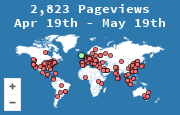
People search for a Google Analytics alternative when GA4 feels like too much interface for the question they have, or when they do not want that much data collection on a small site. The useful answer is not a single replacement. It is which job you are trying to fill.
GA4 is a product analytics suite. It is built for events, sessions, conversions, and ads audiences. A visitor map is a public picture of where loads came from, plus a short stats page. Those overlap on "how many visits, from where," and they diverge everywhere else. Replacing GA4 with a map will disappoint you if you needed funnels. Keeping GA4 and adding a map is reasonable if you also want visitors to see the audience.
Match the tool to the job
| Tool | Best at | Price shape | Public map on your site | Watch-out |
|---|---|---|---|---|
| GA4 | Events, conversions, ads, long funnels | Free, with a learning cost | No | Easy to misconfigure; the interface assumes you know the event model |
| Matomo | A GA-like suite you can host yourself | Free if you self-host, paid cloud | Map plugins exist; not the core product | You operate the server, or you pay someone who does |
| Plausible | A small set of traffic numbers, privacy-first | Paid, by page views | No | No funnels in the classic sense; that is the point |
| Fathom | The same kind of simple dashboard | Paid | No | Less to configure, less to ask of it |
| Cloudflare Web Analytics | Country and page counts at the edge | Free with Cloudflare | No | Only sites it already proxies; thin beyond page views |
| MapMyVisitors | A visitor map and counter visitors can see, plus country, page, and referrer stats | Free | Yes, map or 3D globe | Not a conversion suite and not a UTM report |
Prices and feature lists move. The shape of the table does not: either you want a suite that explains what happened inside a session, or you want a lightweight count of loads and places, or you want both and you install both.
When a visitor map is the right piece
Choose a map, and stop there, when the site is a blog, a community, a personal project, or a brochure, and the decisions you make are geographic or editorial.
- You want a sidebar that shows real visits, not a stock illustration.
- You want countries, pages, and referrers without creating an event taxonomy.
- You want the tag to be a snippet that does not take over the page. The MapMyVisitors widget is an image or a small script.
- You are fine not knowing bounce rate, scroll depth, or which button inside a session got the click. Bounce rate explains that metric, and why a map does not invent a number for it.
Create the widget from the signup page and read what a visitor map measures before you promise anyone a demographic report.
When you still want a suite
Stay on GA4, or move to Matomo, Plausible, or Fathom, when any of these are true:
- You spend money on ads and need a conversion to send back.
- You have a signup or a checkout and you lose people in the middle.
- You tag campaigns and you want source, medium, and campaign as columns. That tagging scheme is UTM tracking. MapMyVisitors keeps the referrer and the page URL. It does not turn those tags into a campaign report.
- A regulator, a client, or your own policy wants a data-processing agreement and a cookie story you can describe precisely. Privacy-focused suites are explicit about this. GA4 can be configured carefully and often is not.
"GA4 is complicated" is a real cost. It is not, by itself, a reason to pick a tool that cannot see the conversion you care about. Complexity you remove has to be complexity you did not need.
A migration that does not throw data away
- Write down the three questions you actually open analytics to answer. If you cannot name them, you are shopping for a feeling.
- Leave the current tag in place. Add the new one beside it for a month.
- Compare country totals and top pages between the two. They will not match exactly. Bots, consent banners, and ad blockers hit each script differently. You are looking for the same top five, not the same integer.
- Only then remove the tool that did not answer the three questions.
If one of the questions is "where in the world are readers, and can they see that too," add the map even if you keep GA4. The map is not competing with the suite on that job. It is doing a job the suite's reports do not put on the public page.
What not to believe in a comparison post
Ignore charts that rank tools by a single score. Ignore anyone who says a free map "replaces Google Analytics" without saying they gave up funnels. Ignore cookie claims you cannot check. A tool is an alternative to GA4 only for the reports you are willing to stop using.