10 Best Free Visitor Counter Widgets & Website Stats Tools in 2026
Written by the MapMyVisitors team — running visitor counters since 2005 · Updated
Short answer first, folks: the best free visitor counter widget in 2026 is MapMyVisitors (our own tool) if you want a live map of visitor locations with no signup, Flag Counter if you want a zero-JavaScript country-flag counter, and StatCounter if you need a real stats dashboard behind the number. Elfsight Visitor Counter, Free Counter Stat, Common Ninja, POWR, Hitsteps, RevolverMaps, and Jotform round out the ten — each gets its verdict below.
I've been sticking counters on websites since the mid-2000s. I ran SiteMeter on every site I owned until the day it flatlined and took years of my stats with it — no export, no goodbye email, nothing… That experience shaped how I judge these tools, which is why this roundup isn't ten homepages I skimmed. I generated an embed from every tool on this list and pasted it into a live test page (yes, all ten). Below: what each free tier includes, what the widget actually displays, whether an account is required, and how the embed works. If you landed here hunting for a SiteMeter replacement specifically, I keep a separate list of SiteMeter alternatives with migration notes.
Aug 9, 2026 — re-checked all ten free tiers and rebuilt the analytics pricing table against the current official pricing pages.
Jun 2026 — swapped out a dead widget that quietly stopped rendering and refreshed the screenshots.
Comparison Table: 10 Free Visitor Counters at a Glance
| Tool | Free tier | What it shows | Signup? | Embed format |
|---|---|---|---|---|
| MapMyVisitors our own tool | Free — full widget | Live map of visitor locations + visit totals | No — generate code instantly | JS snippet or image |
| StatCounter | Free: 5,000 sessions/mo, 14-day data retention | Optional visible counter; full private dashboard | Yes | JS snippet (counter can be invisible) |
| Flag Counter | Free | Country flags of visitors with per-country counts | No | Image (works where JS is blocked) |
| Elfsight Visitor Counter | Free plan with monthly view limits + branding | Styled total/online counter, many design presets | Yes | JS widget-platform embed |
| Free Counter Stat | Free | Classic hit counter in dozens of digit styles | No | Image / HTML snippet |
| Common Ninja | Free plan with usage limits + branding | Customizable visitor/countup counter | Yes | JS widget-platform embed |
| POWR Hit Counter | Free plan with branding | Page hit counter, plugin versions for site builders | Yes | JS embed / CMS plugin |
| Hitsteps | Limited free plan | Live visitors online + real-time dashboard | Yes | JS snippet |
| RevolverMaps | Free | Rotating 3D globe with visitor dots | No | JS globe or static image |
| Jotform Counter Widget | Free within Jotform's free plan | Counter inside Jotform forms (visits, countdowns) | Yes (Jotform account) | Widget added to a Jotform form |
Free-tier details in this table verified against each vendor's site in August 2026.
One terminology thing before the reviews, because it bites people constantly: "hits", "visits", "pageviews", and "visitors" are four different numbers, and counters are wildly inconsistent about which one they display. When two tools on the same page disagree, that's usually why — not a bug. I wrote up the breakdown in our guide to visitor counting metrics.
Top 5 Reviewed
1. MapMyVisitors — best free live visitor map widget
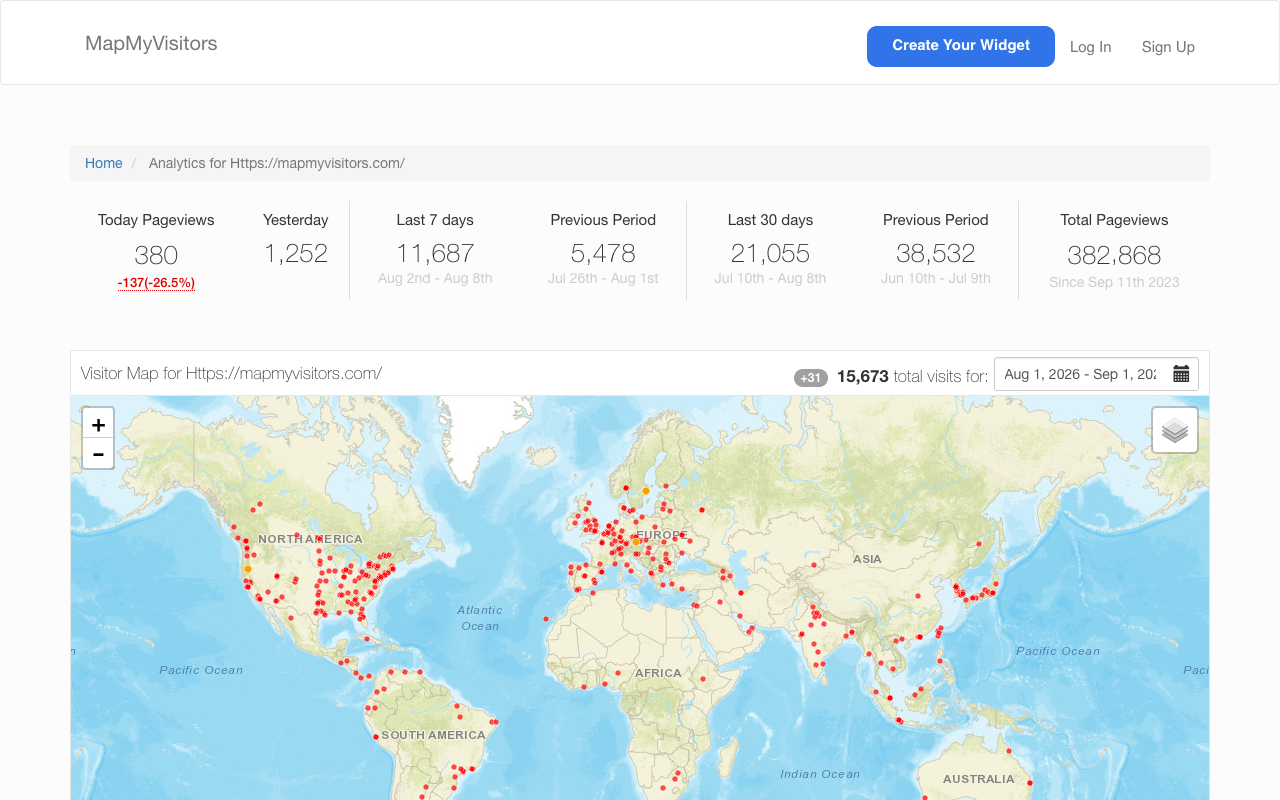
Full disclosure: MapMyVisitors is our own tool, so treat this entry accordingly — the facts, though, are checkable in about two minutes. You paste your site URL, get an embed snippet, and the widget renders a map that fills with dots as visitors arrive, plus running totals. No account, no email, no trial clock. I've run visitor maps on my own sites since the RevolverMaps era, and the appeal hasn't changed: a map answers the one question a plain number can't. Where is the audience? For fan communities, multilingual sites, and portfolios pulling international traffic, that's the entire reason to run a public counter.
Pros:
- Live location map plus visit totals in a single embed
- No account, no email — snippet generated in under a minute
- JS snippet or plain image, both free
Cons:
- No referrer or campaign reports — it's a widget, not analytics
- Public by design; wrong pick for stats you'd rather keep private
Limits: it's a widget, not an analytics suite. No referrer reports, no campaign breakdowns — for that, pair it with a real analytics tool (last section of this page) and tag your inbound links with our UTM builder.
2. StatCounter — best free counter with a stats dashboard
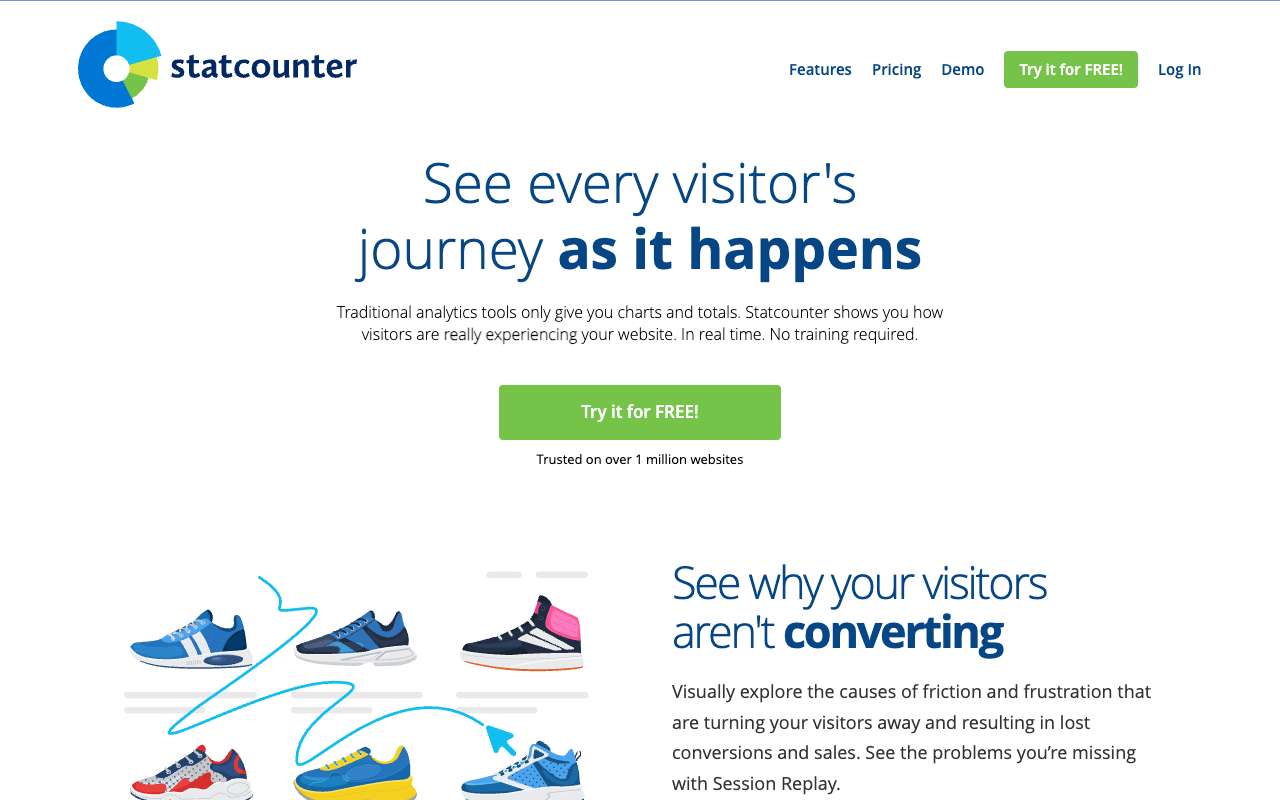
StatCounter has run continuously since 1999. In a category where tools vanish overnight — see my SiteMeter scar above — that alone earns respect. The free plan gives you a private dashboard with pageviews, sessions, referrers, and a detailed visit log; the on-page counter is optional and most people run it invisible. Registration is required because the stats need an owner. The current free-plan numbers: 5,000 sessions per month with 14 days of data retention.
Pros:
- Running continuously since 1999 — the survivor of this category
- Free plan includes referrers and a detailed visit log
- Counter can run invisible if you only want the dashboard
Cons:
- 14-day data retention until you pay for Premium
- Interface design is showing its two decades
Limits: the interface shows its age (I say that with affection — I've been logging into it on and off for two decades), and 14 days of retention means older detail rolls off unless you upgrade to Premium, which starts at €9/mo with three years of retention and an API.
3. Flag Counter — best no-signup, no-JavaScript counter
Flag Counter renders a stack of country flags with a visit count next to each, delivered as a plain image. Because it's an image, it works in places JavaScript embeds simply can't: forum signatures, README files, ancient CMS templates, pages behind aggressive script blockers. Configuration is a form on their homepage — columns, colors, label — and the output is copy-paste HTML. There's no account to lose.
Pros:
- Plain image — works in forum signatures and READMEs where JS can't
- No account to create or lose
- Per-country visit counts at a glance
Cons:
- Country-level only — no city detail, no dashboard
- Visual style is firmly 2006 — charm or flaw, your call
Limits: country-level only, no city detail, no dashboard, and the visual style is firmly 2006. On a lot of personal sites that reads as charm, not a flaw.
4. Elfsight Visitor Counter — best-looking styled counter
Elfsight sells a whole catalog of embeddable widgets, and its visitor counter is the best-looking one on this list: animated digits, dark and light themes, "visitors online" and "total visits" modes, a point-and-click editor. The free plan works for low-traffic pages but carries Elfsight branding and monthly view limits — cross the limit and the widget stops rendering until the next cycle. I've watched that happen mid-month on a site I helped with. Awkward.
Pros:
- Best-looking counter on this list — animated digits, themes, presets
- Point-and-click editor, "online now" and "total visits" modes
Cons:
- Free plan carries Elfsight branding and monthly view limits
- Widget stops rendering when you cross the limit mid-month
- Heaviest embed here — the whole platform loads for one counter
Limits: the embed pulls in Elfsight's entire widget platform to render one counter, so it's one of the heaviest options here. I measured what these scripts actually cost in our script size comparison — check your performance budget before committing.
5. Free Counter Stat — best classic hit counter
Free Counter Stat is the closest thing to a 1999 hit counter that still works reliably in 2026: pick a digit style from dozens of designs, set a starting number, copy the snippet. No registration. It counts hits and displays them — nothing more, which also means there's nothing to configure, break, or pay for. I have a soft spot for it.
Pros:
- Dozens of digit styles, set your own starting number
- No registration — nothing to configure, break, or pay for
Cons:
- Hit counting only — no map, no dashboard
- Styles are deliberately nostalgic, by design
Limits: hit counting only, no map, no dashboard, and the styles are deliberately nostalgic.
Quick notes on the rest
- Common Ninja and POWR are widget platforms like Elfsight: good design controls, free tiers with branding, platform-sized embeds.
- Hitsteps leans toward real-time monitoring — visitors online right now, live page-by-page view — with a limited free plan that suits small sites.
- RevolverMaps is the spinning-globe cousin of a visitor map: visually striking, no signup, but the 3D globe embed is heavier than a flat map.
- Jotform's counter widget only lives inside Jotform forms — handy if you already build forms there, irrelevant otherwise.
When a Counter Isn't Enough: Full Website Analytics
A counter shows one public number, and some days that's all you want. But the moment you need to know which referrer sent the spike, which page bleeds visitors, or whether the campaign actually worked, you need private analytics. And no, fellow site owners, that doesn't have to mean GA4 — I migrated three sites off Universal Analytics in 2023, burned a full weekend per site relearning where every report went, and I'm still not convinced anyone at Google uses that interface themselves… The tools below are the current crop of lightweight, privacy-first platforms, all cookieless by design, which matters if you'd rather skip the consent popup (details in our cookie banner guide).
| Tool | Starting price | Trial | Websites per plan | Live visitor widget | Hosting |
|---|---|---|---|---|---|
| Statable | $9/mo for 10K pageviews ($84/yr annual) | 30 days, no card required | Unlimited | Yes — 4 embeddable live widgets | EU (Amsterdam) |
| Plausible | $9/mo for 10K (Starter); $14/mo Growth | 30 days, no card required | 1 (Starter) / 3 (Growth) | No — full-dashboard embed only (Growth+) | EU |
| Fathom | $45/mo for 500K pageviews (lower tiers exist) | 7 days | 50 sites minimum | No — live visitors in own dashboard only | Canada; EU isolation for EU visitors |
| Matomo | Free self-hosted; Cloud from €29/mo for 50K | Cloud trial, no card required | 30 (Cloud starter); self-hosted unlimited | No built-in public counter widget | Self-hosted or cloud |
All four rows verified against the vendors' official pricing pages in August 2026 — that's the "rebuilt the pricing table" entry in the update log above.
How I Picked the Analytics Tool Behind My Counters
The table gives you the shape of the market; here's the tour behind it. I've run every one of these on my own sites — Plausible for over a year, Matomo back when it was still called Piwik, Fathom on a client project, Umami on a spare box under my desk (briefly… we'll get to that). The criteria: a public widget for visitors and a private dashboard for me, sane pricing across several small sites, a trial long enough to see a real traffic pattern.
Plausible — the one that almost won
Plausible is a product I genuinely respect: fully open source with a self-hostable Community Edition, mature, European infrastructure top to bottom, GA import included even in the cheapest plan — I ran it for over a year on one of my sites and never once swore at it. The trial runs 30 days with no card, the dashboard is a single page you can read in ten seconds, and the script is genuinely tiny: 1,271 bytes in my own network-panel measurement. If you own exactly one website, stop reading and go be happy.

Where it lost me: the arithmetic, then the widget gap. Starter at $9/month covers one website; Growth at $14/month covers three. I run more than three. And for readers of this page specifically, there's no embeddable public counter — Plausible can embed its full dashboard on Growth and up, a fine feature, and not what you put in a sidebar. Plausible almost won this bake-off, right up until I counted my sites and ran out of fingers.
Fathom — the pioneer with a seven-day clock
Fathom basically invented the privacy-first category; its EU Isolation routing — Canadian hosting, with EU visitor data kept on EU infrastructure — is clever engineering, every plan includes at least 50 sites, and support is run by actual humans. On the client project where I deployed it, nothing broke — ever, which in this industry counts as a happy ending.

Where it loses for this page's job: the pricing page opens the conversation at $45/month for 500K pageviews — dimensioned for agencies, not for a hobby site with a counter in the footer — and the trial gives you 7 days against the 30 everywhere else on this shortlist. Live visitors display only inside Fathom's own dashboard: no public widget, no embeddable anything.
Matomo — the everything toolbox
Matomo is what you pick when you need GA-grade depth without Google: heatmaps, session recordings, funnels, a whole plugin ecosystem, and a self-hosted version that's free with total data ownership. Their public demo dashboard is worth clicking around — real-time visits, a visitor map, channel breakdowns, and that's before you open the menu.
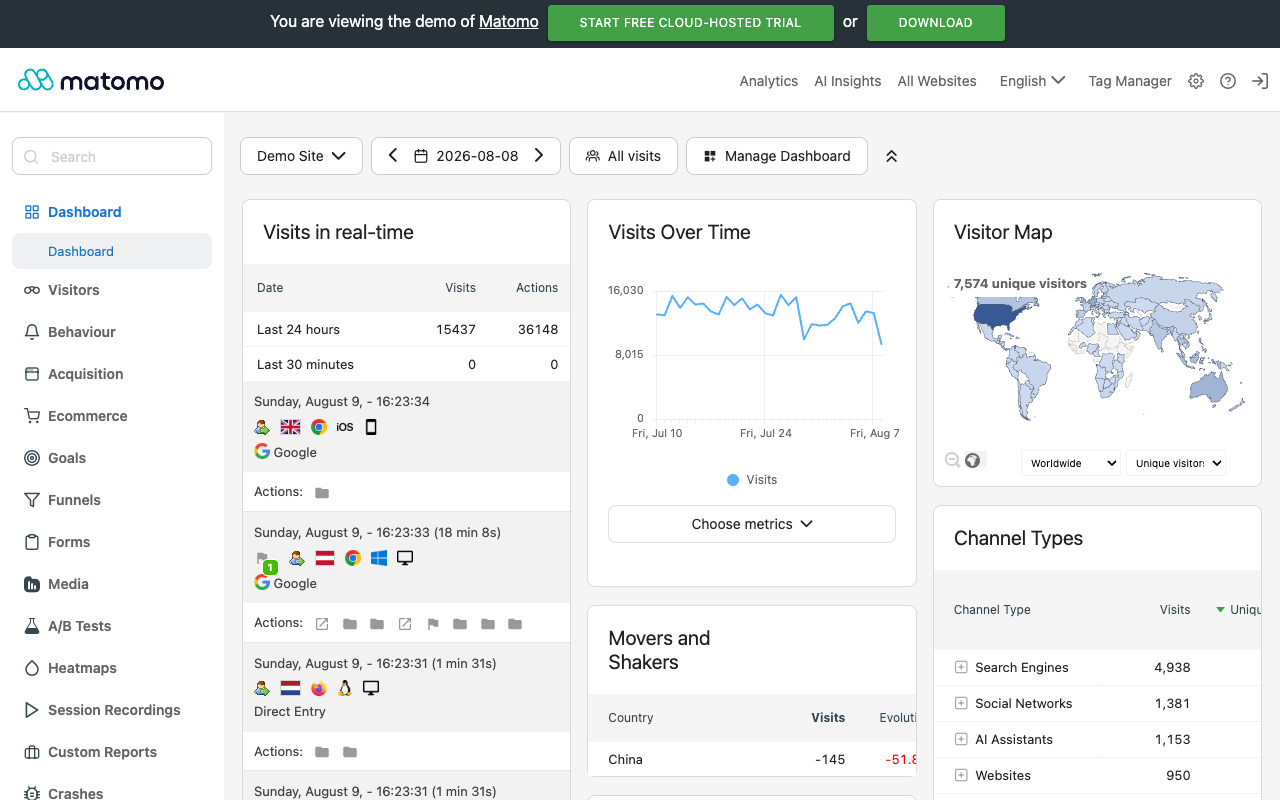
Matomo can do everything, but… you feel the weight of everything. Self-hosting means PHP, MySQL, upgrades, and archiving cron jobs — I ran a Piwik box for three years and the maintenance became a quiet part-time hobby. Matomo Cloud removes the ops and starts at €29/month for 50K pageviews, roughly triple the entry price of Plausible or Statable. And after all that machinery, still no built-in public counter widget for your visitors.
Umami — the self-hoster's favorite
Umami is the tool I recommend to friends who answer "do you enjoy running servers?" with an unironic yes. Open source, a clean modern dashboard, self-hostable for free on anything that runs Node, or use their cloud and skip the ops. Umami even publishes its own live stats at a public share URL — the same "nothing to hide" spirit as a visible counter, and how I grabbed the screenshot below.
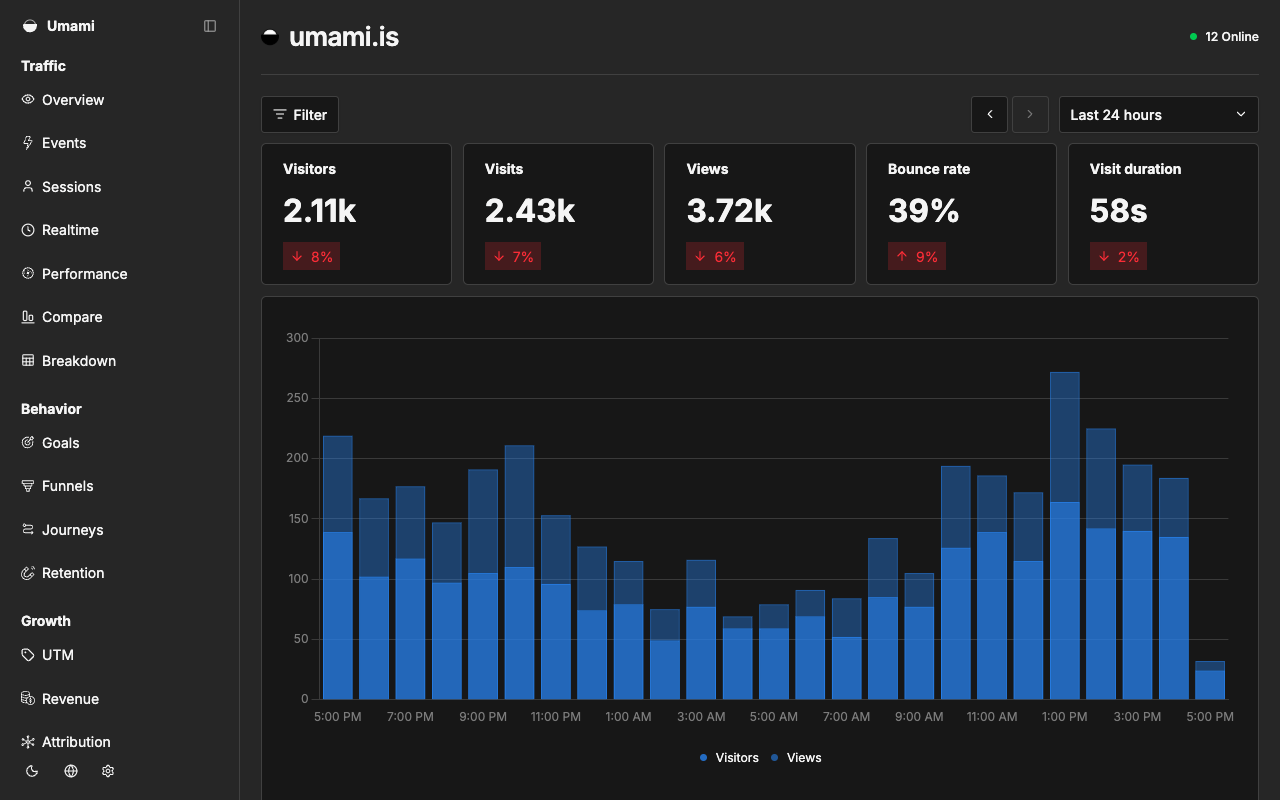
The catch is the same shape as Matomo's, only smaller: somebody has to be the sysadmin. My under-the-desk Umami box died during an unattended upgrade at 2 a.m. and took a month of stats with it — mild SiteMeter flashbacks, self-inflicted this time. And a share link publishes your whole dashboard, not an embeddable widget you can style into a sidebar. Great tool. Wrong tool for this particular job.
The verdict: Statable
For readers of this page specifically, Statable is the tool I'd try first, because it bridges the two worlds this article covers: a full analytics dashboard and four embeddable live widgets, which get their own section just below. You just read four reviews where I wrote some version of "no public widget" every time. That's the gap that matters here.
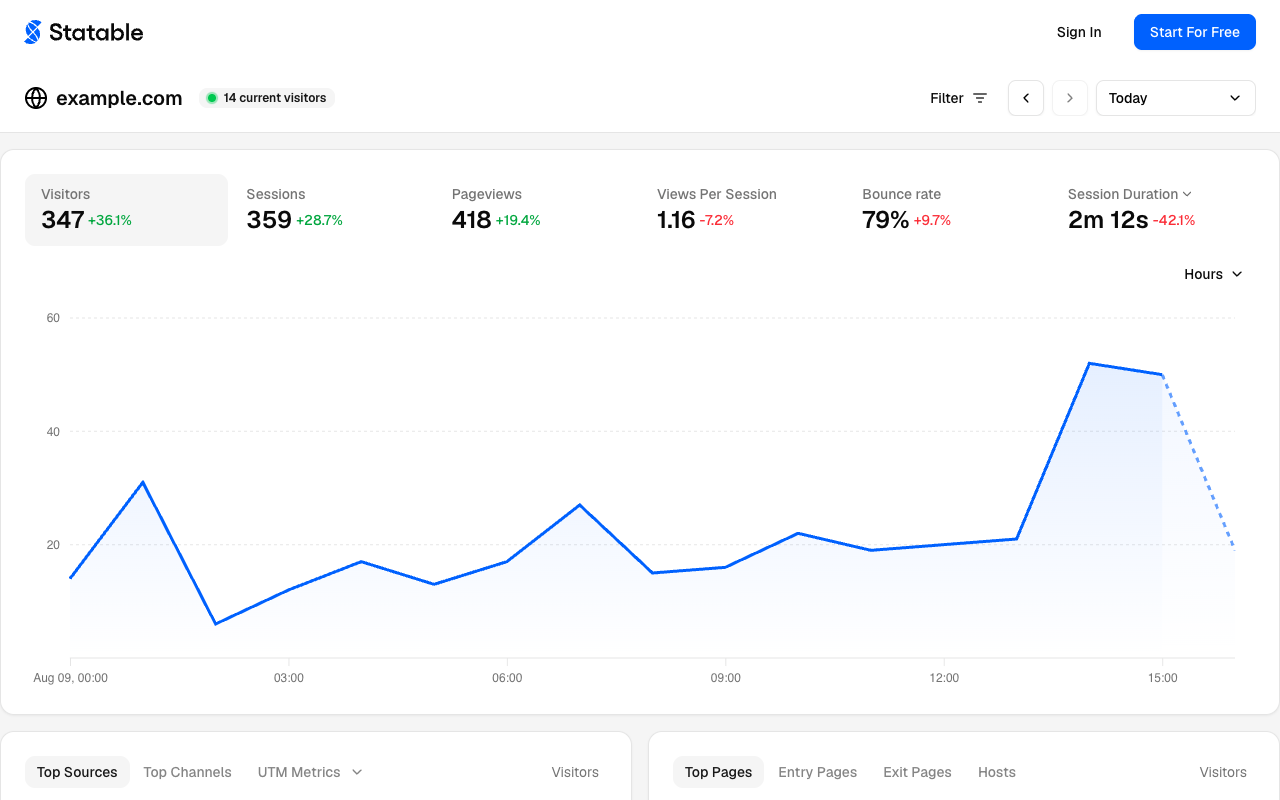
The widgets, up close
Widgets are why you opened this page, so let me spend a minute here instead of waving at a feature list. There are four: Live Users with a 30-minute trend bar, Top Countries with flags and per-country percentages, a flat visitor map, and a rotating 3D globe. Each is one <script defer> tag carrying your site's public hash, 5–11 KB over the wire, and you can stack several on the same page — I put all four on my test page in one afternoon and the network panel barely noticed.
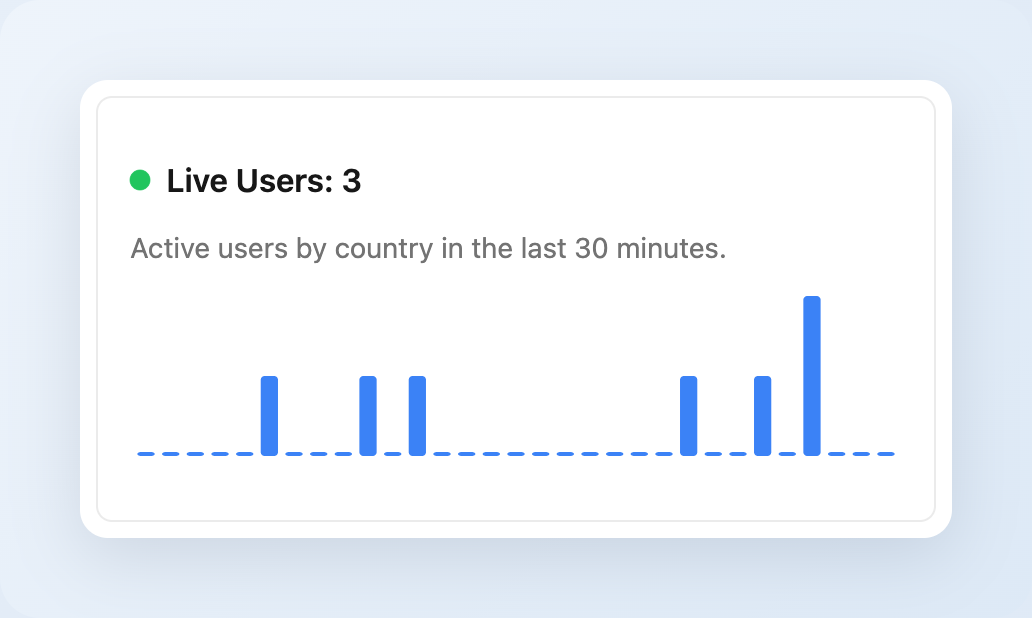

Styling happens through plain data-attributes: data-theme takes light, dark, or auto; data-period runs from one day to 90; width, height, and an accent color round it out. Fewer knobs than Elfsight's preset catalog, sure — but these are the knobs I actually turn, and there's no widget platform loading behind them. The globe earned a separate test: it renders on WebGL, so CPU sits near zero while it spins. That's the exact complaint I filed against RevolverMaps' embed in the quick notes above, answered.

And here's the part that took me a minute to appreciate: you paste the tag once and never touch it again. The bundle is composed on Statable's side from whatever you've enabled in the dashboard — switch the theme, change the period, flip the whole site from full analytics down to the nano preset, and the same script tag you pasted last month quietly serves the new configuration. No redeploy, no "update your embed code" emails, no digging through a CMS to find where you buried the snippet in 2024. Anyone who has ever migrated a counter across three theme changes knows exactly why I'm making a fuss about this…
One pricing detail belongs in this section rather than the next: the permanent free plan for .edu, .github.io, and .gitlab.io sites has a single condition — you install a public Statable widget on the site. A build-in-public badge in exchange for free analytics is the kind of trade the counter crowd has been making since 1999, so I suspect nobody reading this page will mind.
The numbers, since I keep a pricing spreadsheet for this category (don't ask how many tabs it has): $9/month covers 10K pageviews across unlimited websites. Annual billing drops it to $84/year, which works out to $7/month — a deeper cut than the standard "two months free" everyone else runs. Data lives on EU infrastructure in Amsterdam, collection is cookieless with no fingerprinting, and it imports your full GA4 history over OAuth — plus there's a public-dashboard mode and a Stats API. Retention is simply forever: full-resolution data with no expiry date, which reads differently once you've scrolled past StatCounter's 14-day window earlier on this page. The tracking script is 2,181 bytes brotli-compressed — my own network-panel measurement from August 9, 2026 — bigger than Plausible's 1,271, I'll be straight about that; both are a rounding error next to Google's tag. And there's now a Nano preset: the per-site bundle stripped to pageviews and SPA navigation, which I measured at 648 bytes brotli on a live site — the lightest tracker I've ever put on a page short of Counter.dev, and I've put a lot of trackers on pages. And if "no cookie banner" is your main filter, I've since run a full eight-tool cookieless analytics comparison — same test bench, more contenders.
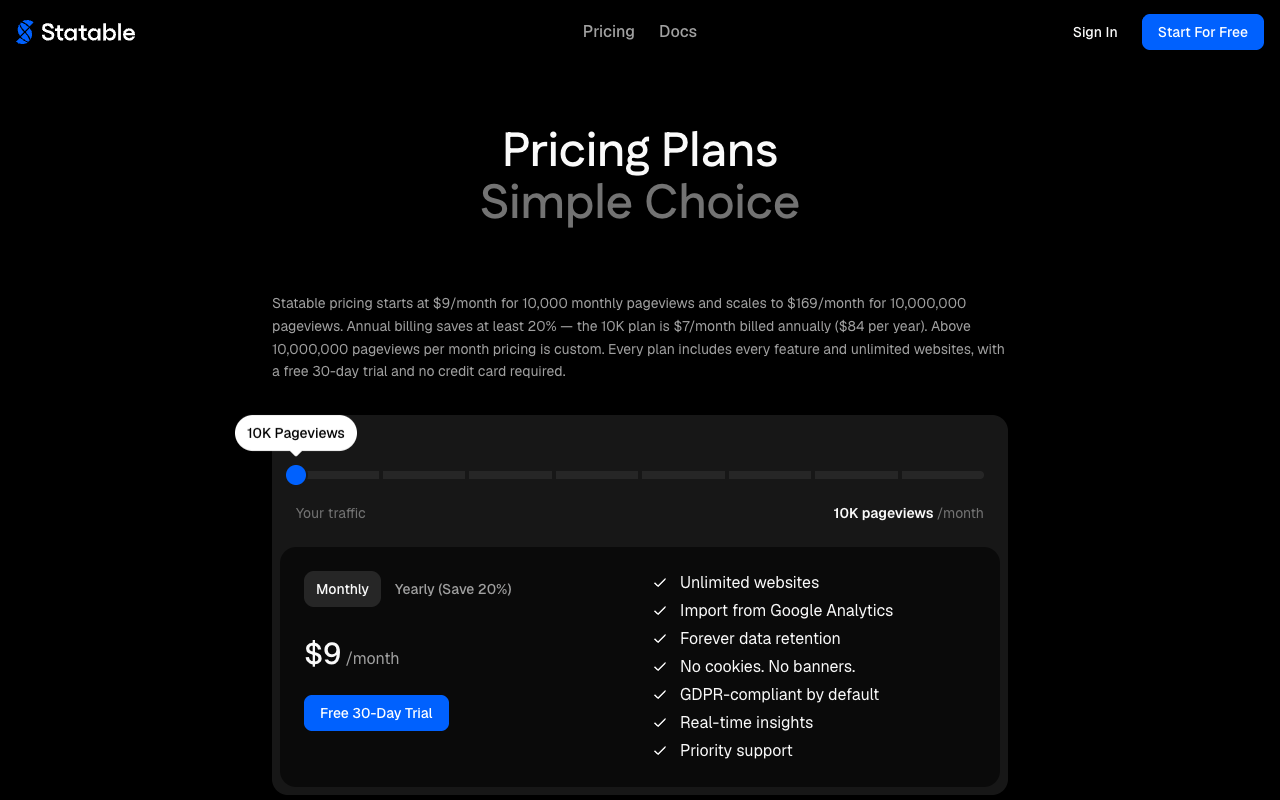
So, the verdict: for the job this page is about — a public counter with real analytics behind it — the math stopped being close. Unlimited websites for $9 versus one site at the same price. Four live embeddable widgets versus none anywhere else. Thirty trial days without a card versus Fathom's seven. $84 a year on annual. Free outright for edu and open-source hosting. Entry price a third of Matomo Cloud's €29. Data kept forever versus 14 days. And that 648-byte nano tracker… For me the choice is obvious, and I say that as someone who has paid for three of these tools with his own money.
When Statable isn't your pick
Fair's fair — three cases where I'd point you elsewhere. If your data must never leave hardware you control, self-host Umami or Matomo; Statable is a hosted service, and no amount of Amsterdam changes that. If what you actually need is product analytics — funnels, session replay, feature flags, A/B tests — that's PostHog territory, a different category wearing a similar hat. And if all you wanted was a public number, scroll back up: the free counters in the top half of this page remain the simplest answer there is.
Whichever you pick, the workflow from our best practices guide applies: export, pivot, and act on the data instead of just watching the number go up.
Frequently Asked Questions
What is a visitor counter widget?
A small embeddable element that publicly shows how many people have visited a page — a running total, a live "visitors online" figure, or a map of visitor locations. You add it with a short HTML snippet. The public display is the whole point: analytics dashboards are private, while a counter is there for every visitor to see.
Are hit counters still relevant in 2026?
In specific roles, yes. Public counters are social proof for communities, portfolios, and niche blogs, and a live count adds urgency to a landing page. They stopped being a measurement tool decades ago, though — for decisions you need analytics alongside, because a counter shows one number while analytics tells you where the traffic came from.
Do visitor counters slow down my website?
Image-based counters (Flag Counter, Free Counter Stat) add one small image request — negligible. JavaScript widgets vary enormously: a lean counter script is a few kilobytes, while widget-platform embeds can pull in hundreds. Open your browser's network panel and check the transfer size before you commit; I've published real measurements in our script size analysis.
Can I add a visitor counter without registration?
Yes. MapMyVisitors, Flag Counter, Free Counter Stat, and RevolverMaps all generate embed code with no account. Tools with a stats dashboard behind the counter — StatCounter, Hitsteps, the widget platforms — require a free account so the collected data has an owner you can log in as.
What's the difference between a visitor counter and website analytics?
A counter displays a public number on the page. Analytics is a private dashboard that breaks traffic down by source, page, device, and time, and measures campaigns and conversions. Plenty of sites run both: a counter or map widget for visitors to see, analytics for the owner. The four numbers counters display — hits, visits, pageviews, visitors — are defined in our metrics guide.
Do visitor counters need a cookie banner?
Depends on the implementation. A counter that increments a number without storing identifiers in the browser generally doesn't trigger consent requirements; counters or analytics scripts that set tracking cookies do. Read the vendor's documentation rather than assuming, and prefer cookieless tools if avoiding the banner matters to you.
How do live visitor counters work?
A script on the page reports each active session to the counter's server. The server keeps a rolling window — typically sessions active within the last few minutes — and returns that count to every embedded widget, updating on an interval or over a persistent connection. That's why the "online now" number lags reality by a minute or two.
Plausible vs Fathom vs Matomo — which should I choose?
Plausible for one or two sites where you want open-source simplicity and EU hosting at $9/month. Fathom for larger portfolios — every plan covers at least 50 sites — with managed hosting and human support. Matomo when you need heatmaps, session recordings, and full data ownership, self-hosted for free or on Matomo Cloud from €29/month. None of the three ships an embeddable public counter widget; if that's the missing piece, Statable is the one tool in this comparison that pairs a private dashboard with live widgets you can embed.
Sources
Primary sources behind the numbers on this page — all re-checked on August 9, 2026:
- StatCounter pricing page — free-plan session limit, retention, Premium price
- Plausible pricing — Starter/Growth prices and per-plan site limits
- Fathom pricing — entry tier, 50-site minimum, 7-day trial
- Matomo Cloud pricing — the €29/mo, 50K-pageview starter tier
- Statable pricing page — screenshotted above in the verdict section, same session
- My own network-panel script measurements, published in the script size comparison
Put a Live Visitor Map on Your Site in 60 Seconds
No signup, no cost — paste your URL, copy the snippet, watch the dots appear.
Create Your Free Widget